
Usagette
使用制限をメニューバーに。上昇に合わせて音でお知らせ。

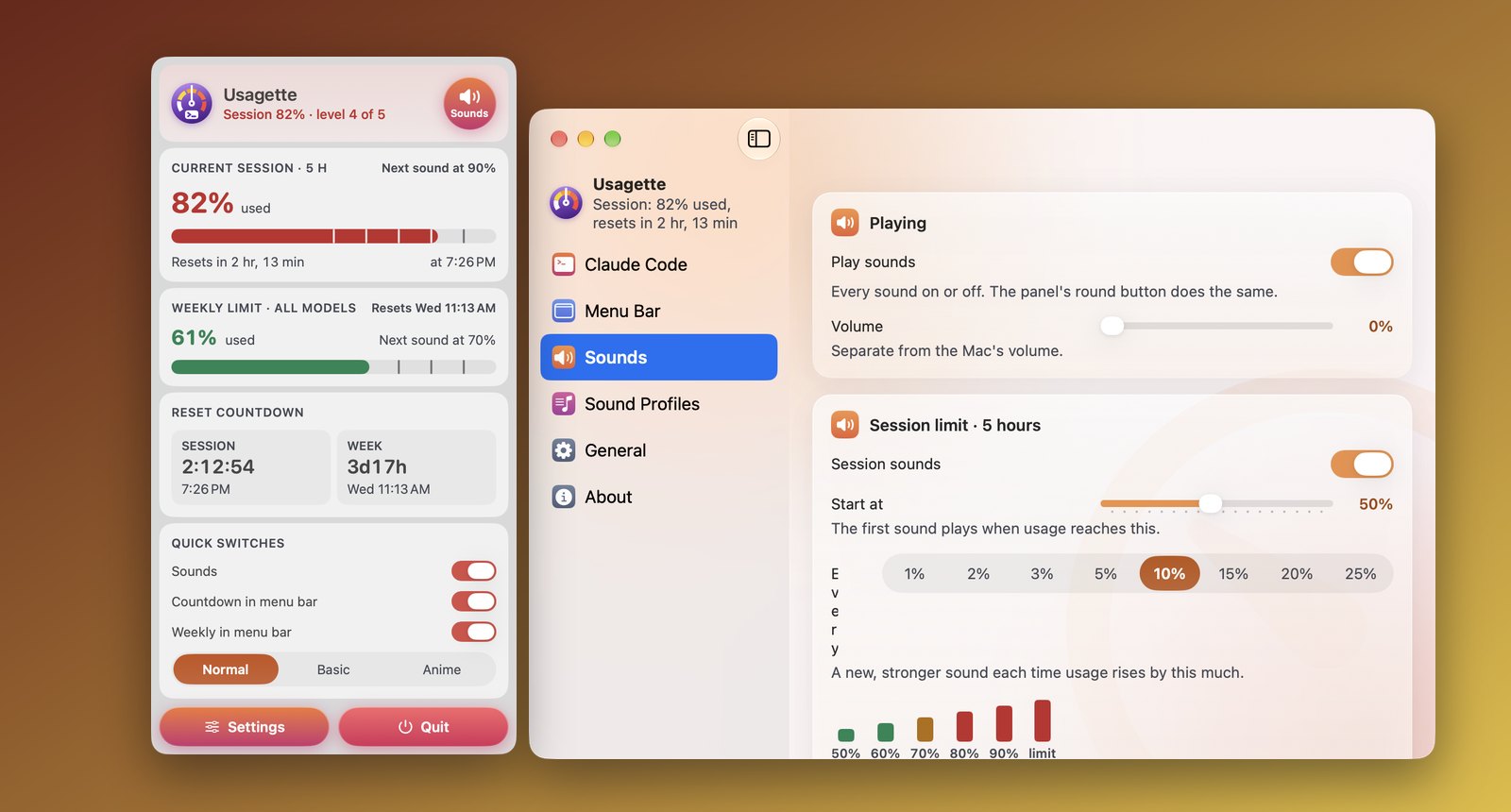
Visual simulation. Usagette monitors local Claude Code session limits directly in your Mac menu bar without cloud API keys.
できること
UsagetteはMacのメニューバーに常駐し、Claudeの使用制限をどれだけ使ったかを表示します。5時間セッションの制限、7日間の週間制限、そして各リセットまでのライブカウントダウンです。表示する項目はオン/オフでき、パネルを開けば全体を確認できます。
- Claude Codeのステータスラインから読み取り。UsagetteはClaude Codeがすでに報告している数値を保存する小さなステータスラインスクリプトを設定します。お使いのステータスラインもそのまま動作します。数値はClaude Codeの使用中に更新され、セッションの合間はカウントダウンがそのまま進みます。
- 使用量とともに高まる音。音を鳴らし始める位置と、音どうしの間隔を選べます。各段階は5段階で一段ずつ強くなるので、見なくてもどれだけ近づいたかが分かります。上限に達したときとリセットされたときの音もあります。
- プロファイル。Normal(やわらかなチャイム)、Basic(macOS標準のサウンド)、Anime(きらめきとボイス、少しコミカル)、Custom(お好みのサウンドファイル)。ご自身のサウンドプロファイルファイルを読み込むこともできます。
- 必要なときは静かに。おやすみ時間、ミュートスイッチ、Macのロック中は無音。
- ショートカットとログイン時に開く機能も、ファミリーのほかのアプリと同じように使えます。
macOS 14 Sonoma以降とClaude Codeが必要です。Mac App Storeで近日公開。使用制限は、制限のあるサブスクリプションプランでClaude Codeが表示します。
無料のサウンドプロファイル
Usagette 用のサウンドを無料でダウンロードできます。どれも5つのレベルを上がっていき、上限とリセットのための専用サウンドがあります。
- ダウンロード8-Bit Adventure. コインとパワーアップ、続いてエラー音と体力低下の警報、上限でゲームオーバーの叫び、リセット時にファンファーレ。 サウンド制作:Juhani Junkala、パブリックドメイン(CC0)。
- ダウンロードArcade Announcer. ゲームのアナウンサー:最初は落ち着いた実況、上がるにつれて「Hurry up!」や「Look out!」、上限で「Game over」。 ボイス制作:Kenney、パブリックドメイン(CC0)。
- ダウンロードMusic Box. ぜんまい仕掛けの小さなメロディ。上限が近づくにつれて、遅く低く止まっていきます。 Usagette のために作ったオリジナルサウンド。
- ダウンロードRetro Console. 架空の8ビット機のチップチューン音:パワーアップ、警告サイレン、ゲームオーバーのメロディ。 Usagette のために作ったオリジナルサウンド。
- ダウンロードSinging Bowls. 最初はやわらかな鉢の音がひとつ、上がるにつれて低く間隔が詰まり、上限でゴングが鳴ります。 Usagette のために作ったオリジナルサウンド。
- ダウンロードSonar Dive. 潜水艦のソナー:ぽつんと響く探信音から次第に速くなり、上限で潜航警報、浮上中は泡の音。 Usagette のために作ったオリジナルサウンド。
追加するには、Usagette の設定 › サウンドプロファイルを開いて読み込む…を選ぶか、ダウンロードしたファイルをそこにドロップします。ZIPを展開して、プロファイルをダブルクリックしても追加できます。
Unexpected lockouts vs Usagette
Monitor your Claude Code session and weekly limits directly from the macOS menu bar.
| Aspect | Manual Guesswork / Web Dashboard | Usagette |
|---|---|---|
| Sudden Lockouts | Mid-coding error: 'Usage limit reached until 3:00 PM' | Live countdown in menu bar so you pace complex programming tasks |
| Status Line Integration | Manually checking web dashboards or guessing limits | Reads Claude Code status metrics automatically from your local CLI |
| Model Awareness | No visibility into how models drain quota | Visual feedback highlights token burn across Opus, Sonnet and Haiku |
| Proactive Alerts | Finding out you are locked out only when a prompt fails | Gentle native chime or banner alert before your quota runs dry |
| Privacy & Setup | Complex API keys and cloud account sign-ins | Zero API keys required; reads local terminal session output safely |
プライバシーを1段落で
Usagetteにはネットワークアクセスもアカウントもトラッキングもなく、データがMacの外に出ることはありません。読み取るのは、ステータスラインスクリプトが書き込む1つのファイルだけで、場所は使用を許可した.claudeフォルダ内です。プライバシーポリシーの全文でも、同じ内容をもう少し詳しく説明しています。
同じ開発者のほかのアプリ
ひとつのことをきちんとこなす、小さなアプリたち。アカウントも広告もなく、どれもあなたを追跡しません。
 StatuetteCPU・メモリ・ディスク・ネットワークをメニューバーに。Mac
 Tocketteメニューバーからドラッグするだけのタイマー。MaciPhone・iPadAndroid
 Zonette気になるタイムゾーンを、ワンクリックで。MaciPhone・iPadAndroid
 Lunette月と太陽を、ひと目で。MaciPhone・iPadAndroid
 Lunarette4つの伝統の旧暦カレンダー。MaciPhone・iPadAndroid
 Pausette目と背中に、やさしい休憩を。Mac
 Poisette着けているAirPodsが、背すじを伸ばすよう知らせます。MaciPhone・iPad
 Hushetteループしない、穏やかな環境音。MaciPhone・iPadAndroid
 Tapsodyタイプするたびにメカニカルキーボードの音。Mac
 Thrumline心拍数を、メニューバーでリアルタイムに。MaciPhone・iPadAndroid
 NightjarMacをスリープさせません。正直に。Mac
 Umbrette作業中のウインドウ以外をすべて暗く。Mac
 Prompetteカメラのすぐ下にプロンプター。MaciPhone・iPadAndroid
 Tallette計算のための紙テープ。MaciPhone・iPadAndroid
 Probetteメディアファイルの技術情報を、わかりやすい言葉で。MaciPhone・iPadAndroid
 Bindette音声ファイルを、1冊のちゃんとしたオーディオブックに。MaciPhone・iPadAndroid
 Lettrettewinmail.datと.msgファイルを、送られたとおりに開きます。MaciPhone・iPadAndroid
 Nhanh Tay4つの答えを正しい順に。すばやく。MaciPhone・iPadAndroid
 Pinetteいつも目に入るメモ。MaciPhone・iPadAndroid
 Squiggoやさしい相棒といっしょに絵を描こう。MaciPhone・iPadAndroid
 Foreman職人のための案件、見積り、請求書。MaciPhone・iPadAndroid
 Tilewake絵が目を覚ますスライドパズル。MaciPhone・iPadAndroid
 Chăm luyệnベトナムの小学生向け練習、読み上げ付き。MaciPhone・iPadAndroidWindows
 Salah家族みんなのための礼拝時刻。MaciPhone・iPadAndroid
 Kittiwakeニュースに問いを立て、ひとつのシグナルで追う。MaciPhone・iPadAndroid
 Readetteどんな記事リンクにも、無料の関連記事をMaciPhone・iPadAndroid
 TinkerhallSee how everyday machines work, one part at a time.MaciPhone・iPadAndroid
 Snapline最初に壊れる部材を予想しよう。MaciPhone・iPadAndroid
 Leafette片方のページに集めて、もう片方に書く。MaciPhone・iPadAndroid
 Whence発明のつながり。MaciPhone・iPadAndroid
 WhimbrelShape a living world, then walk through it.MaciPhone・iPadAndroid
 Penduline日本の組紐を設計し、プレビューして、組む。MaciPhone・iPadAndroid
 Phalarope回すと絵が動く円盤・皿・カップをデザイン。MaciPhone・iPadAndroid
 Turnstoneカード織りの帯をデザインし、一越ずつ織り上げる。MaciPhone・iPadAndroid
 Redknotひとりでに編まれるケルト結び目文様をデザイン。MaciPhone・iPadAndroid
 Sanderlingボビンレースをデザインし、ステッチごとに編み進める。MaciPhone・iPadAndroid
 Dotterel手まりを3Dでデザインし、手順どおりにかがる。MaciPhone・iPadAndroid
 Godwit本物の日時計を設計して、印刷やカットまで。MaciPhone・iPadAndroid
 Dunlin一度録画するだけ。縦と横のビデオができ、撮影後に両方をリフレームできます。iPhone・iPadAndroid
 Avocet好きな画像の色を自分のショットにコピーして、3D LUT としてどこへでも持ち運べます。MaciPhone・iPadAndroid
 Greenshank熱が本物のクッキングゲーム。熱の広がりを見ながら、ホットスポットから食材をずらし、ちょうどいいタイミングで裏返そう。MaciPhone・iPadAndroid
 Willetオルゴールパズル。曲を聴いて、ビーズとベルの小さなしかけを作り、同じ曲を奏でましょう。MaciPhone・iPadAndroid
 Courserひと振りで1階。満ちてくる潮より先に、断崖と灯台を登ってランプへ。MaciPhone・iPadAndroid
 Surfbirdパートを録音し、それに合わせて演奏して、テープに4トラックを重ねよう。どのオーバーダブもぴったり合います。MaciPhone・iPadAndroid
 Curlew数字の石をくっつけ、割り、ひっくり返して、すべての巣をぴったりの数で満たそう。MaciPhone・iPadAndroid
 Yellowlegsピンを正しい順に抜こう。種と水は鉢へ、火種は入れずに。MaciPhone・iPadAndroid
 Tattler手順を教えるヒント付きの、5つの定番鉛筆ロジックパズル。MaciPhone・iPadAndroid
 Smewスマホで紙のマーブリング。絵の具を落とし、くしで引き、渦を巻いて、エブルの模様を学べます。MaciPhone・iPadAndroid
 Brolgaコントラダンスの動きを見て、自作し、成り立つか確認し、コールの練習ができます。MaciPhone・iPadAndroid
 Lapwingあみだを組んで、すべての玉を同じ色のカップへ。MaciPhone・iPadAndroid
 Pratincoleステンドグラスのパネルを設計し、難しいカットを見つけ、実際のガラスにテンプレートを置けます。MaciPhone・iPadAndroid
 Fulmar1本糸の凧を設計し、糸目を決めて、実寸のパネルを印刷して切って縫えます。MaciPhone・iPadAndroid
 Bittern卵のデザインに色を付けると、ろうと染めの順序を手順ごとに確認できます。MaciPhone・iPadAndroid
 Killdeer縮尺どおりのアジリティとフーパーズのコースを、測定してルールチェック。MaciPhone・iPadAndroid
 Wrybill数え、足し、記憶するビー玉マシンを作ろう。MaciPhone・iPadAndroid
 Dowitcher地震計の記録を読み、震央を見つけ、地震の規模を測ろう。MaciPhone・iPadAndroid
 Dovekie理由まで見せてくれる完全なソルバーと、定番の二人用ゲームで対戦。MaciPhone・iPadAndroid