⏱️ Claude usage limits in your menu bar · Stay ahead of rate limits

Usagette
你的用量限額,就在選單列,上升時有聲音提示。

68%
Limit resets in 1h 42m
Visual simulation. Usagette monitors local Claude Code session limits directly in your Mac menu bar without cloud API keys.
功能簡介
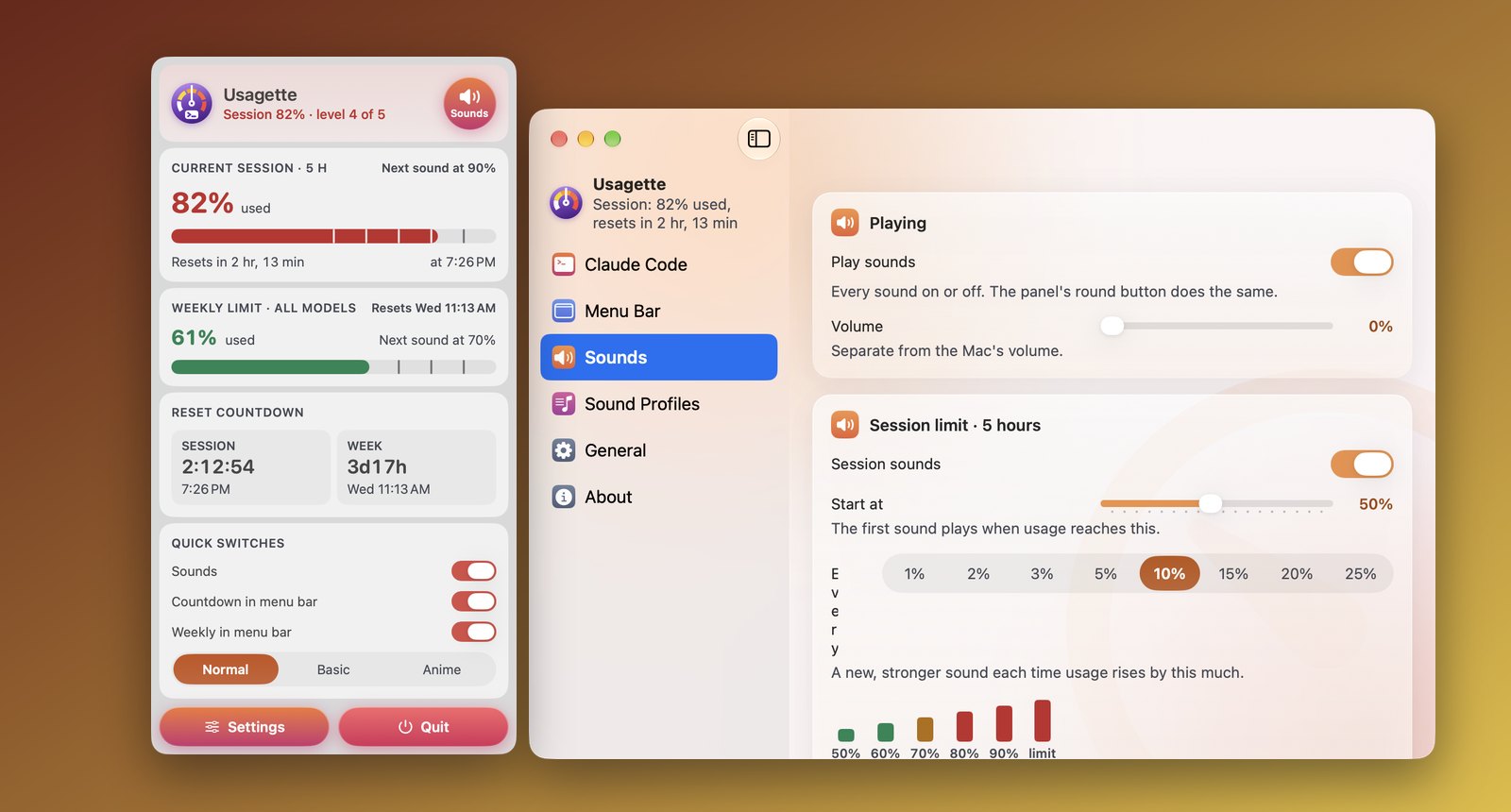
Usagette 位於 Mac 選單列,顯示你已用掉多少 Claude 用量限額:5 小時工作階段限額、7 天每週限額,以及到每次重置的即時倒數。可依需求開關讀數的各個部分,打開面板查看全貌。
- 從 Claude Code 的狀態列讀取。Usagette 會設定一個小型狀態列腳本,儲存 Claude Code 本來就會回報的數字。你自己的狀態列照常運作。數字會在你使用 Claude Code 時更新;兩次工作階段之間,倒數繼續走動。
- 聲音隨用量升高。選擇提示音從哪裡開始以及相鄰之間的間隔。每一級都更強,共五級,所以不用看也能聽出離限額有多近。到達限額和重置時也有提示音。
- 設定檔。一般(輕柔鐘聲)、基本(macOS 標準聲音)、動漫(閃光和語音台詞,稍微搞笑一點)和自訂(你自己的聲音檔案)。你還可以匯入自己的聲音設定檔。
- 該安靜時就安靜。安靜時段、靜音開關,以及 Mac 鎖定時保持靜默。
- 捷徑和登入時打開,與家族中的其他 App 一樣。
需要 macOS 14 Sonoma 或更新版本以及 Claude Code。即將登陸 Mac App Store。用量限額由 Claude Code 為設有限額的訂閱方案顯示。
免費聲音描述檔
為 Usagette 提供更多聲音,可免費下載。每套都會隨著五個等級逐步升高,並有各自的上限提示音與重置提示音。
- 下載8-Bit Adventure. 金幣與強化道具,接著是錯誤提示音與低血量警報,到上限時是遊戲結束的慘叫,重置時是一段號角。 聲音:Juhani Junkala,公有領域(CC0)。
- 下載Arcade Announcer. 遊戲播報員:起初是平靜的播報,隨著升高是「Hurry up!」與「Look out!」,到上限時是「Game over」。 語音:Kenney,公有領域(CC0)。
- 下載Music Box. 上發條的小曲子,隨著接近上限而變得更慢、更低沉。 原創聲音,專為 Usagette 製作。
- 下載Retro Console. 來自假想 8 位元遊戲機的晶片音樂嗶聲:強化道具、警告警報與遊戲結束旋律。 原創聲音,專為 Usagette 製作。
- 下載Singing Bowls. 起初是一聲輕柔的缽音,隨著升高變得更低、更密集,到上限時是一聲鑼響。 原創聲音,專為 Usagette 製作。
- 下載Sonar Dive. 潛艇聲納:先是零星的探測聲,隨後加快,到上限時是下潛警報,上浮時是氣泡聲。 原創聲音,專為 Usagette 製作。
要加入,請在 Usagette 中開啟「設定 › 聲音描述檔」並選擇「輸入…」,或將下載的檔案拖放到那裡。也可以先解壓縮,再按兩下該描述檔。
Unexpected lockouts vs Usagette
Monitor your Claude Code session and weekly limits directly from the macOS menu bar.
| Aspect | Manual Guesswork / Web Dashboard | Usagette |
|---|---|---|
| Sudden Lockouts | Mid-coding error: 'Usage limit reached until 3:00 PM' | Live countdown in menu bar so you pace complex programming tasks |
| Status Line Integration | Manually checking web dashboards or guessing limits | Reads Claude Code status metrics automatically from your local CLI |
| Model Awareness | No visibility into how models drain quota | Visual feedback highlights token burn across Opus, Sonnet and Haiku |
| Proactive Alerts | Finding out you are locked out only when a prompt fails | Gentle native chime or banner alert before your quota runs dry |
| Privacy & Setup | Complex API keys and cloud account sign-ins | Zero API keys required; reads local terminal session output safely |
一段話說明隱私權
Usagette 沒有網路存取、帳號和追蹤,沒有任何內容會離開你的 Mac。它只讀取其狀態列腳本寫入的一個檔案,位於你允許其使用的 .claude 檔案夾中。完整的隱私權政策更詳細地說明了同樣的內容。
同一開發者的更多 App
小巧的 App,每一款都專心做好一件事。無需帳號,沒有廣告,也沒有一款會追蹤你。
 Statuette在選單列查看 CPU、記憶體、磁碟和網路。Mac
 Tockette從選單列輕輕一拖,計時器就開始了。MaciPhone 和 iPadAndroid
 Zonette你在意的每個時區,按一下就能看到。MaciPhone 和 iPadAndroid
 Lunette月亮和太陽,一目了然。MaciPhone 和 iPadAndroid
 Lunarette四種傳統的農曆。MaciPhone 和 iPadAndroid
 Pausette為眼睛和腰背安排溫和的休息。Mac
 Poisette坐直身子,由你戴著的 AirPods 提醒。MaciPhone 和 iPad
 Hushette寧靜的環境音,從不循環重複。MaciPhone 和 iPadAndroid
 Tapsody打字時發出機械鍵盤的聲音。Mac
 Thrumline你的心率,即時顯示在選單列。MaciPhone 和 iPadAndroid
 Nightjar讓 Mac 保持喚醒。實實在在。Mac
 Umbrette調暗一切,只留下你正在工作的視窗。Mac
 Prompette就在相機下方的提詞機。MaciPhone 和 iPadAndroid
 Tallette為你的算帳準備的一卷紙帶。MaciPhone 和 iPadAndroid
 Probette媒體檔案的所有技術細節,用淺白的話說清楚。MaciPhone 和 iPadAndroid
 Bindette把音訊檔案合成一本像樣的有聲書。MaciPhone 和 iPadAndroid
 Lettrette按寄出時的原樣打開 winmail.dat 和 .msg 檔案。MaciPhone 和 iPadAndroid
 Nhanh Tay把四個答案排好順序。要快。MaciPhone 和 iPadAndroid
 Pinette讓便條一直在你眼前。MaciPhone 和 iPadAndroid
 Squiggo和友善的小夥伴一起畫畫。MaciPhone 和 iPadAndroid
 Foreman給師傅的工作、報價與發票。MaciPhone 和 iPadAndroid
 Tilewake畫面會甦醒的滑塊拼圖。MaciPhone 和 iPadAndroid
 Chăm luyện越南語小學練習,題目都會朗讀。MaciPhone 和 iPadAndroidWindows
 Salah全家人的禱告時間。MaciPhone 和 iPadAndroid
 Kittiwake向新聞提一個問題,盯住一個訊號。MaciPhone 和 iPadAndroid
 Readette為任何文章連結找到免費的相關閱讀MaciPhone 和 iPadAndroid
 TinkerhallSee how everyday machines work, one part at a time.MaciPhone 和 iPadAndroid
 Snapline預測哪根桿件最先斷。MaciPhone 和 iPadAndroid
 Leafette在一頁收集,在另一頁書寫。MaciPhone 和 iPadAndroid
 Whence發明如何相連。MaciPhone 和 iPadAndroid
 WhimbrelShape a living world, then walk through it.MaciPhone 和 iPadAndroid
 Penduline規劃、預覽並編織日本組紐繩。MaciPhone 和 iPadAndroid
 Phalarope設計轉起來就會動的動畫圓盤、盤子和杯子。MaciPhone 和 iPadAndroid
 Turnstone設計卡片織帶,再一梭一梭織出來。MaciPhone 和 iPadAndroid
 Redknot設計自動交織的凱爾特繩結圖案。MaciPhone 和 iPadAndroid
 Sanderling設計線梭花邊,再一針一針編出來。MaciPhone 和 iPadAndroid
 Dotterel用 3D 設計手鞠球,再一步步繡出來。MaciPhone 和 iPadAndroid
 Godwit設計真正的日晷,然後列印或切割。MaciPhone 和 iPadAndroid
 Dunlin只錄一次。得到直式和橫式兩部影片,拍完再為它們重新構圖。iPhone 和 iPadAndroid
 Avocet把你鍾愛的圖片色彩複製到自己的畫面上,並以 3D LUT 隨身帶著走。MaciPhone 和 iPadAndroid
 Greenshank一款火候真實的烹飪遊戲:看著熱量擴散,把食物從熱點上挪開,在恰當的時刻翻面。MaciPhone 和 iPadAndroid
 Willet八音盒益智遊戲:先聽一段旋律,再用珠子和鈴鐺打造一台小機器,把它演奏出來。MaciPhone 和 iPadAndroid
 Courser一滑,一層。趕在潮水漲起之前,爬過海邊懸崖和燈塔,登上燈。MaciPhone 和 iPadAndroid
 Surfbird錄一段,跟著它演奏,把四條音軌疊在錄音帶上。每一次疊錄都準確合拍。MaciPhone 和 iPadAndroid
 Curlew合併、分裂、翻轉帶數字的石頭,讓每個巢都放進恰好對應的數字。MaciPhone 和 iPadAndroid
 Yellowlegs按對順序拔銷釘:種子和水落進花盆,火炭擋在外面。MaciPhone 和 iPadAndroid
 Tattler五種經典鉛筆邏輯謎題,提示會講解每一步推理。MaciPhone 和 iPadAndroid
 Smew在手機上玩水拓畫:滴入、梳理、旋轉顏料,學習傳統 ebru 紋樣。MaciPhone 和 iPadAndroid
 Brolga觀看 contra 舞的動態,自己編舞,檢查是否可行,並練習喊舞。MaciPhone 和 iPadAndroid
 Lapwing搭好梯子,讓每顆珠子落進自己的顏色。MaciPhone 和 iPadAndroid
 Pratincole設計彩繪玻璃面板,找出難切的地方,把版型放在真實玻璃上。MaciPhone 和 iPadAndroid
 Fulmar設計單線風箏,調好拉線,列印真實尺寸的各片來裁剪縫製。MaciPhone 和 iPadAndroid
 Bittern為你的彩蛋圖案上色,逐步得到上蠟與染色順序。MaciPhone 和 iPadAndroid
 Killdeer依比例設計犬敏捷和 Hoopers 賽道,自動測量並依規則檢查。MaciPhone 和 iPadAndroid
 Wrybill打造會計數、做加法、能記憶的彈珠機器。MaciPhone 和 iPadAndroid
 Dowitcher讀地震圖,找震央,測地震的規模。MaciPhone 和 iPadAndroid
 Dovekie經典雙人遊戲,對手是會告訴你為什麼的完美求解器。MaciPhone 和 iPadAndroid