⏱️ Claude usage limits in your menu bar · Stay ahead of rate limits

Usagette
你的用量限额,就在菜单栏,上升时有声音提示。

68%
Limit resets in 1h 42m
Visual simulation. Usagette monitors local Claude Code session limits directly in your Mac menu bar without cloud API keys.
功能简介
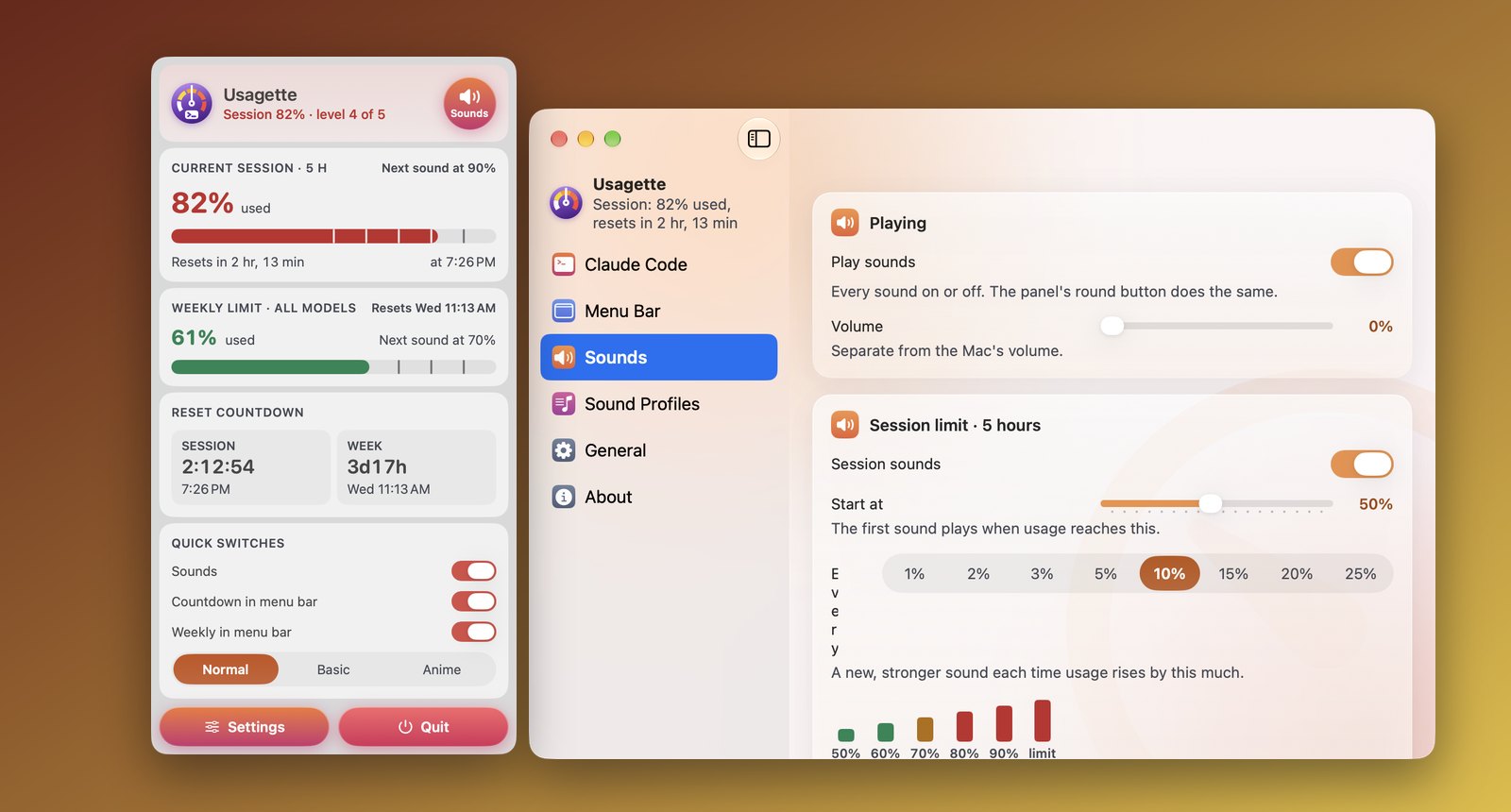
Usagette 位于 Mac 菜单栏,显示你已用掉多少 Claude 用量限额:5 小时会话限额、7 天每周限额,以及到每次重置的实时倒计时。可按需开关读数的各个部分,打开面板查看全貌。
- 从 Claude Code 的状态栏读取。Usagette 会设置一个小型状态栏脚本,保存 Claude Code 本来就会报告的数字。你自己的状态栏照常工作。数字会在你使用 Claude Code 时刷新;两次会话之间,倒计时继续走动。
- 声音随用量升高。选择提示音从哪里开始以及相邻之间的间隔。每一级都更强,共五级,所以不用看也能听出离限额有多近。到达限额和重置时也有提示音。
- 配置。普通(轻柔钟声)、基本(macOS 标准声音)、动漫(闪光和语音台词,稍微搞笑一点)和自定(你自己的声音文件)。你还可以导入自己的声音配置文件。
- 该安静时就安静。安静时段、静音开关,以及 Mac 锁定时保持静默。
- 快捷指令和登录时打开,与家族中的其他 App 一样。
需要 macOS 14 Sonoma 或更高版本以及 Claude Code。即将登陆 Mac App Store。用量限额由 Claude Code 为设有限额的订阅套餐显示。
免费声音配置
为 Usagette 提供更多声音,可免费下载。每套都会随着五个级别逐步升高,并有各自的上限提示音和重置提示音。
- 下载8-Bit Adventure. 金币和强化道具,然后是错误提示音和低血量警报,到上限时是游戏结束的惨叫,重置时是一段号角。 声音:Juhani Junkala,公有领域(CC0)。
- 下载Arcade Announcer. 游戏播报员:起初是平静的播报,随着升高是“Hurry up!”和“Look out!”,到上限时是“Game over”。 语音:Kenney,公有领域(CC0)。
- 下载Music Box. 上发条的小曲子,随着接近上限而变得更慢、更低沉。 原创声音,专为 Usagette 制作。
- 下载Retro Console. 来自假想 8 位游戏机的芯片音乐哔声:强化道具、警告警报和游戏结束旋律。 原创声音,专为 Usagette 制作。
- 下载Singing Bowls. 起初是一声轻柔的钵音,随着升高变得更低、更密集,到上限时是一声锣响。 原创声音,专为 Usagette 制作。
- 下载Sonar Dive. 潜艇声呐:先是零星的探测声,随后加快,到上限时是下潜警报,上浮时是气泡声。 原创声音,专为 Usagette 制作。
要添加,请在 Usagette 中打开“设置 › 声音配置”并选择“导入…”,或将下载的文件拖放到那里。也可以先解压,再双击该配置。
Unexpected lockouts vs Usagette
Monitor your Claude Code session and weekly limits directly from the macOS menu bar.
| Aspect | Manual Guesswork / Web Dashboard | Usagette |
|---|---|---|
| Sudden Lockouts | Mid-coding error: 'Usage limit reached until 3:00 PM' | Live countdown in menu bar so you pace complex programming tasks |
| Status Line Integration | Manually checking web dashboards or guessing limits | Reads Claude Code status metrics automatically from your local CLI |
| Model Awareness | No visibility into how models drain quota | Visual feedback highlights token burn across Opus, Sonnet and Haiku |
| Proactive Alerts | Finding out you are locked out only when a prompt fails | Gentle native chime or banner alert before your quota runs dry |
| Privacy & Setup | Complex API keys and cloud account sign-ins | Zero API keys required; reads local terminal session output safely |
一段话说明隐私
Usagette 没有网络访问、账户和追踪,没有任何内容会离开你的 Mac。它只读取其状态栏脚本写入的一个文件,位于你允许其使用的 .claude 文件夹中。完整的隐私政策更详细地说明了同样的内容。
同一开发者的更多应用
小巧的应用,每一款都专心做好一件事。无需账户,没有广告,也没有一款会追踪你。
 Statuette在菜单栏查看 CPU、内存、磁盘和网络。Mac
 Tockette从菜单栏轻轻一拖,计时器就开始了。MaciPhone 和 iPadAndroid
 Zonette你关心的每个时区,点一下就能看到。MaciPhone 和 iPadAndroid
 Lunette月亮和太阳,一目了然。MaciPhone 和 iPadAndroid
 Lunarette四种传统的农历。MaciPhone 和 iPadAndroid
 Pausette为眼睛和腰背安排温和的休息。Mac
 Poisette坐直身子,由你戴着的 AirPods 提醒。MaciPhone 和 iPad
 Hushette宁静的环境音,从不循环重复。MaciPhone 和 iPadAndroid
 Tapsody打字时发出机械键盘的声音。Mac
 Thrumline你的心率,实时显示在菜单栏。MaciPhone 和 iPadAndroid
 Nightjar让 Mac 保持唤醒。实实在在。Mac
 Umbrette调暗一切,只留下你正在工作的窗口。Mac
 Prompette就在摄像头下方的提词器。MaciPhone 和 iPadAndroid
 Tallette为你的算账准备的一卷纸带。MaciPhone 和 iPadAndroid
 Probette媒体文件的所有技术细节,用通俗的话说清楚。MaciPhone 和 iPadAndroid
 Bindette把音频文件合成一本像样的有声书。MaciPhone 和 iPadAndroid
 Lettrette按发送时的原样打开 winmail.dat 和 .msg 文件。MaciPhone 和 iPadAndroid
 Nhanh Tay把四个答案排好顺序。要快。MaciPhone 和 iPadAndroid
 Pinette让便签一直在你眼前。MaciPhone 和 iPadAndroid
 Squiggo和友好的小伙伴一起画画。MaciPhone 和 iPadAndroid
 Foreman给手艺人的工作、报价单和发票。MaciPhone 和 iPadAndroid
 Tilewake画面会苏醒的滑块拼图。MaciPhone 和 iPadAndroid
 Chăm luyện越南语小学练习,题目都会朗读。MaciPhone 和 iPadAndroidWindows
 Salah全家人的祈祷时间。MaciPhone 和 iPadAndroid
 Kittiwake向新闻提一个问题,盯住一个信号。MaciPhone 和 iPadAndroid
 Readette为任何文章链接找到免费的相关阅读MaciPhone 和 iPadAndroid
 TinkerhallSee how everyday machines work, one part at a time.MaciPhone 和 iPadAndroid
 Snapline预测哪根杆件最先断。MaciPhone 和 iPadAndroid
 Leafette在一页收集,在另一页书写。MaciPhone 和 iPadAndroid
 Whence发明如何相连。MaciPhone 和 iPadAndroid
 WhimbrelShape a living world, then walk through it.MaciPhone 和 iPadAndroid
 Penduline规划、预览并编织日本组纽绳。MaciPhone 和 iPadAndroid
 Phalarope设计转起来就会动的动画圆盘、盘子和杯子。MaciPhone 和 iPadAndroid
 Turnstone设计卡片织带,再一梭一梭织出来。MaciPhone 和 iPadAndroid
 Redknot设计自动交织的凯尔特绳结图案。MaciPhone 和 iPadAndroid
 Sanderling设计线梭花边,再一针一针编出来。MaciPhone 和 iPadAndroid
 Dotterel用 3D 设计手鞠球,再一步步绣出来。MaciPhone 和 iPadAndroid
 Godwit设计真正的日晷,然后打印或切割。MaciPhone 和 iPadAndroid
 Dunlin只录一次。得到竖版和横版两个视频,拍完再为它们重新构图。iPhone 和 iPadAndroid
 Avocet把你钟爱的图片的色彩复制到自己的画面上,并以 3D LUT 随身带走。MaciPhone 和 iPadAndroid
 Greenshank一款火候真实的烹饪游戏:看着热量扩散,把食物从热点上挪开,在恰当的时刻翻面。MaciPhone 和 iPadAndroid
 Willet八音盒益智游戏:先听一段旋律,再用珠子和铃铛搭一台小机器,把它演奏出来。MaciPhone 和 iPadAndroid
 Courser一滑,一层。赶在潮水涨起之前,爬过海边悬崖和灯塔,登上灯。MaciPhone 和 iPadAndroid
 Surfbird录一段,跟着它演奏,把四条音轨叠在磁带上。每一次叠录都准确合拍。MaciPhone 和 iPadAndroid
 Curlew合并、分裂、翻转带数字的石头,让每个巢都放进恰好对应的数字。MaciPhone 和 iPadAndroid
 Yellowlegs按对顺序拔销钉:种子和水落进花盆,火炭挡在外面。MaciPhone 和 iPadAndroid
 Tattler五种经典铅笔逻辑谜题,提示会讲解每一步推理。MaciPhone 和 iPadAndroid
 Smew在手机上玩水拓画:滴入、梳理、旋转颜料,学习传统 ebru 纹样。MaciPhone 和 iPadAndroid
 Brolga观看 contra 舞的动态,自己编舞,检查是否可行,并练习喊舞。MaciPhone 和 iPadAndroid
 Lapwing搭好梯子,让每颗珠子落进自己的颜色。MaciPhone 和 iPadAndroid
 Pratincole设计彩色玻璃面板,找出难切的地方,把模板放在真实玻璃上。MaciPhone 和 iPadAndroid
 Fulmar设计单线风筝,调好拉线,打印真实尺寸的各片来裁剪缝制。MaciPhone 和 iPadAndroid
 Bittern为你的彩蛋图案上色,逐步得到上蜡与染色顺序。MaciPhone 和 iPadAndroid
 Killdeer按比例设计犬敏捷和 Hoopers 赛道,自动测量并按规则检查。MaciPhone 和 iPadAndroid
 Wrybill搭建会计数、做加法、能记忆的弹珠机器。MaciPhone 和 iPadAndroid
 Dowitcher读地震图,找震中,测地震的大小。MaciPhone 和 iPadAndroid
 Dovekie经典双人游戏,对手是会告诉你为什么的完美求解器。MaciPhone 和 iPadAndroid